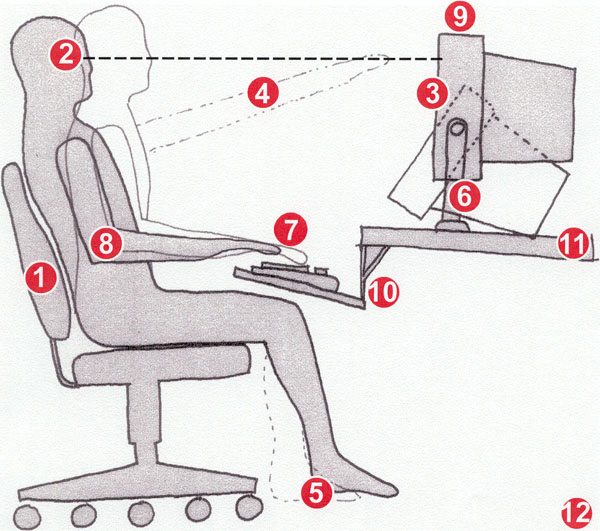
12 tips for an Ergonomic Computer Workstation
|

|
- use a good chair with a dynamic chair back and sit back in this
- top of monitor casing 2-3" (5-8 cm) above eye level
- no glare on screen, use an optical glass anti-glare filter where needed
- sit at arms length from monitor
- feet on floor or stable footrest
- use a document holder, preferably in-line with the computer screen
- wrists flat and straight in relation to forearms to use
keyboard/mouse/input device
- arms and elbows relaxed close to body
- center monitor and keyboard in front of you
- use a negative tilt keyboard tray with an upper mouse platform or
downward tiltable platform adjacent to keyboard
- use a stable work surface and stable (no bounce) keyboard tray
- take frequent short breaks (microbreaks)
|
| Information on this page was compiled by the DEA651 class of
2000 - Bethany Johnson; Emily Kuperstein; Mari Mitchell; Heidi Tinnes; with Garrick
Goh (TA) and Professor
Alan Hedge
For more detailed guidance see the Ergonomic
Guidelines for arranging a Computer Workstation.
January 25, 2009
|